Choosing the right height for a projector screen is very important. It helps you watch movies and shows comfortably. If the screen is too low or too high, your neck or eyes might hurt. Also, the picture might not look good. This guide will help you understand how high to place your projector screen.
Why Screen Height Matters
When you watch a projector screen, you want the picture to be clear and easy to see. The height of the screen affects your viewing comfort. If it is too low, you might have to bend your neck down. If it is too high, you might look up too much. Both can cause discomfort.
Also, the screen height affects the image quality. The projector casts light in a certain angle. If the screen is placed wrong, the image can look distorted or cut off. So, setting the right height is very important.
Common Screen Height Rules
Here are some simple rules to help you decide the height of your projector screen.
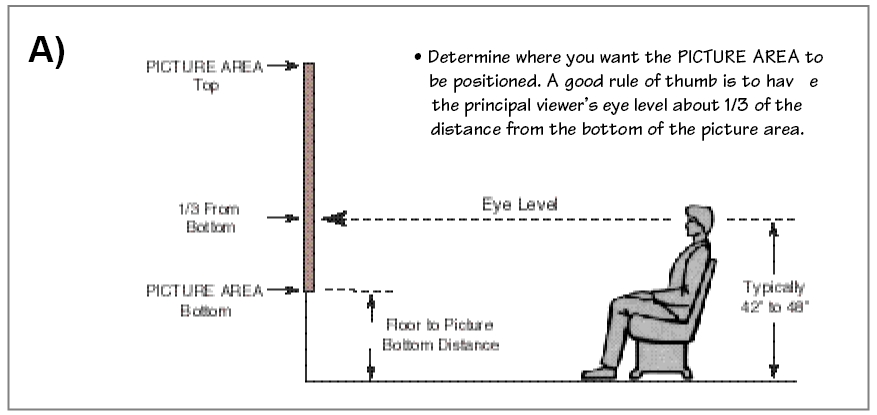
- Eye Level Rule: The center of the screen should be at your eye level when seated.
- Minimum Height: The bottom of the screen should be at least 24 inches from the floor.
- Viewing Angle: The screen should be placed so you do not have to tilt your head more than 15 degrees up or down.
Step-by-Step to Find the Right Height
Follow these steps to find the best screen height for your room.
Step 1: Measure Your Eye Level When Seated
Sit on your couch or chair where you usually watch the screen. Use a tape measure to find the height from the floor to your eyes. Most people have an eye level between 40 and 45 inches from the floor.
Step 2: Know Your Screen Size
The screen size is the diagonal length from one corner to the opposite corner. For example, a 100-inch screen is common for home theaters. Bigger rooms may use bigger screens.
Step 3: Find The Screen Center Height
The center of the screen should be close to your eye level. For example, if your eye level is 42 inches, place the screen center near that height.
Step 4: Calculate Bottom Screen Height
To find the bottom height, subtract half of the screen height from the center height. Screen height depends on the width and aspect ratio.
For example:
| Screen Size (Diagonal) | Aspect Ratio | Screen Width (inches) | Screen Height (inches) |
|---|---|---|---|
| 100″ | 16:9 | 87.2″ | 49.0″ |
| 120″ | 16:9 | 104.6″ | 58.8″ |
| 150″ | 16:9 | 130.9″ | 73.7″ |
So, if your screen height is 49 inches, and your eye level is 42 inches, the bottom of the screen will be:
42 inches – (49 inches ÷ 2) = 17.5 inches
This means the bottom of the screen will be 17.5 inches above the floor.
Tips for Different Rooms
Your room size and seating position affect the screen height.
Small Rooms
In small rooms, viewers sit closer to the screen. The screen should be a bit higher. It helps reduce neck strain.
Large Rooms
In big rooms, viewers sit farther away. The screen can be placed lower. People can see the picture easily without tilting their heads.
Multiple Seating Levels
If your room has more than one seating level, find an average eye height. Or place the screen so most viewers see it well.
Projector Position and Screen Height
The projector lens height also matters. The projector should be aligned with the screen center. If the projector is too high or low, the image may look tilted.
You can adjust the projector mount or zoom to fix this. But a good screen height helps prevent problems.
Wall Mount or Ceiling Mount Screen?
If you mount the screen on the wall, measure the height carefully. Use the steps above.
For ceiling-mounted screens, consider how high the ceiling is. Make sure the screen is easy to see from your seat.
Common Mistakes to Avoid
- Placing the screen too low. It makes watching uncomfortable.
- Placing the screen too high. It causes neck strain.
- Ignoring the projector’s throw angle. It can distort the image.
- Not measuring eye level before installation.
- Choosing a screen size too big for the room.
Summary: Best Height for Projector Screen
To find the best height:
- Measure your eye level when seated.
- Calculate the screen height from size and aspect ratio.
- Place the screen center near your eye level.
- Ensure the bottom screen edge is at least 24 inches from floor.
- Adjust projector position to match the screen height.
Following these simple steps will help you enjoy movies and games more. Your neck and eyes will thank you.

Extra Tips for Viewing Comfort
- Use comfortable chairs with good back support.
- Keep the room lighting dim but not too dark.
- Place speakers near the screen for better sound.
- Take breaks during long viewing to rest your eyes.
Setting your projector screen height right is easy. It only takes some measuring and planning. Your home theater will feel cozy and fun.
Frequently Asked Questions
How High Should A Projector Screen Be Mounted?
The projector screen should be mounted so the center is at eye level when seated. Usually, this means about 40 to 48 inches from the floor. This height reduces neck strain and gives the best viewing angle.
What Is The Ideal Height For A Projector Screen?
Ideal height places the bottom of the screen 24 to 36 inches above the floor. This allows comfortable viewing for most people sitting in chairs or couches. Adjust slightly based on your seating height.
Should The Projector Screen Be Higher Than Eye Level?
No, the screen should not be much higher than eye level. Keeping the screen center at or just below eye level prevents neck strain. It also helps maintain a clear picture without distortion.
How To Measure Projector Screen Height Correctly?
Measure from the floor to the screen’s center or bottom edge. Use your seating height to decide the best screen height. Keep the screen visible from all seats without tilting your head.