Projectors are great tools to show movies, pictures, or presentations. Many people wonder if projectors can be placed at an angle. The short answer: yes, but there are some things to know first.
What Does It Mean To Have A Projector At An Angle?
Usually, projectors sit straight in front of a screen or wall. This means the light comes out straight and hits the screen evenly. But sometimes, you may want to put the projector a bit to the side or up high. This is what we call “placing a projector at an angle.”
Placing a projector at an angle means the projector is not facing the screen directly. It can be tilted up, down, or to the left or right.
Why Do People Place Projectors At An Angle?
- Space Limits: Sometimes, you do not have space to put a projector right in front of the screen.
- Room Setup: The room may have furniture or doors that block the straight path.
- Ceiling Mount: Many people mount projectors on the ceiling, which means the projector points down at an angle.
- Creative Placement: Some want a unique look or to avoid people walking in front of the projector beam.
What Happens When A Projector Is Placed At An Angle?
When the projector is not straight, the image on the screen can look strange. It may be stretched or look like a trapezoid instead of a rectangle. This effect is called keystone distortion.
Keystone distortion happens because the projector lens is not facing the screen directly. The light hits the screen unevenly. The top or side of the image can look bigger or smaller than the other parts.
How To Fix Keystone Distortion?
Many projectors come with a keystone correction feature. This tool helps fix the image shape when the projector is at an angle. The projector changes the image to look more rectangular.
There are two types of keystone correction:
- Digital Keystone Correction: The projector changes the image inside its software. The image looks right, but sometimes it loses a bit of quality.
- Lens Shift: Some projectors have a lens that moves inside the projector. This lets you move the image without changing its shape. Lens shift is better for picture quality.
Tips For Using Projectors At An Angle
Here are some easy tips to help you place your projector at an angle:
- Use Keystone Correction: Turn on this feature to fix image shape.
- Try Lens Shift: If your projector has this, use it for better image quality.
- Keep The Angle Small: The bigger the angle, the worse the image can look.
- Choose The Right Screen: Some screens reflect light better at angles.
- Adjust The Projector Height: Try to keep the projector as level as possible.
- Test The Setup: Move the projector and test the image before final placement.
Problems You May Face When Projectors Are At An Angle
| Problem | Why It Happens | How To Fix |
|---|---|---|
| Keystone distortion | Projector not facing screen directly | Use keystone correction or lens shift |
| Blurred edges | Angle causes light to spread unevenly | Adjust projector position and focus |
| Faded colors | Light hits screen at a sharp angle | Use high gain screens or move projector closer |
| Shadow or dark spots | Objects blocking the light path | Clear path or change projector location |
What Is The Best Angle For A Projector?
The best angle is no angle. Place the projector straight in front of the screen. This gives the best picture quality.
If you cannot place it straight, keep the angle small. Try to stay within 15 degrees left, right, up, or down. More than this can cause big image problems.
Use lens shift if your projector has it. This helps move the image without causing distortion.
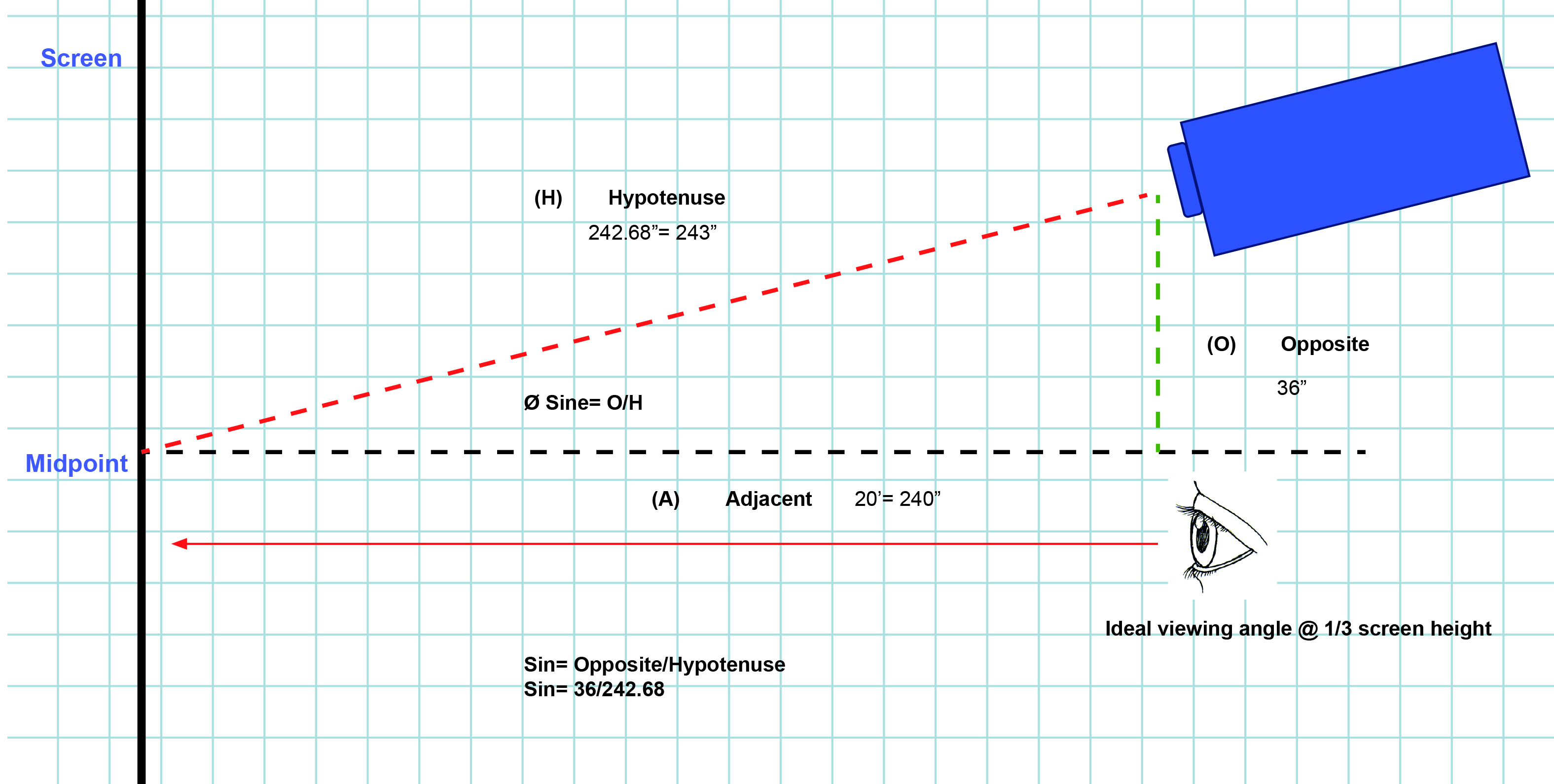
Ceiling Mounted Projectors And Angles
Many people put projectors on the ceiling. This means the projector points down at an angle. This is common and works well.
For ceiling mounts, check if your projector has a ceiling mount mode. This flips the image so it shows right side up.
Make sure the projector is centered above the screen. This reduces keystone distortion and keeps the picture clear.
Using Projectors Outside Or In Unusual Places
Sometimes you want to use a projector outside or in a place where straight placement is hard. You may have to put it at an angle.
In these cases, use a tripod or adjustable stand. This helps you find the right angle and height.
Use keystone correction to fix the image shape. Also, pick a screen that works well in daylight or uneven light.

Frequently Asked Questions
Can Projectors Be Placed At An Angle To The Screen?
Projectors can be placed at an angle, but image quality might reduce. Keystone correction helps fix the shape, but some distortion may remain.
What Happens If A Projector Is Tilted Too Much?
Tilting a projector too much causes image distortion and blurriness. The picture may look stretched or trapezoid-shaped.
Does Angled Projection Affect Image Brightness?
Yes, projecting at an angle can reduce brightness and clarity. Light spreads unevenly, making some parts dimmer than others.
How To Fix Image Distortion From Angled Projector Placement?
Use keystone correction or lens shift features to adjust the image shape. These tools help straighten the picture and improve viewing quality.
Conclusion
Yes, projectors can be at an angle. But the picture may not look perfect without fixes.
Use keystone correction or lens shift to improve the image. Keep the angle small for best results. Ceiling mounts and outdoor setups often need angles but can still work well.
Always test your projector setup before starting your movie or presentation. This way, you get the best picture possible.
Remember, a straight projector is best. But with some help, angled projectors work too!